
简介
QRext4j是一个简单、易用的二维码生成工具,可自定义二维码颜色和码眼样式。
使用
运行环境:
JDK_1.8及以上,由于此生成器引用了部分JDK_1.8的特性, 如需兼容JDK_1.7,可以通过修改少许代码实现。
Maven坐标:
<dependency>
  <groupId>org.iherus</groupId>
  <artifactId>qrext4j</artifactId>
  <version>1.3.1</version>
</dependency>
QrcGen接口及使用说明:
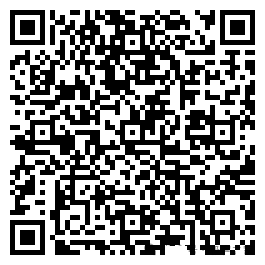
案例一:默认配置
writeToFile:
String content = "https://baike.baidu.com/item/%E5%97%B7%E5%A4%A7%E5%96%B5/19817560?fr=aladdin";

new SimpleQrcodeGenerator().generate(content).toFile("F:\\AodaCat_default.png");
writeToStream:
OutputStream out = null;

try {
    out = new FileOutputStream("F:\\AodaCat_default.png");
    new SimpleQrcodeGenerator().generate(content).toStream(out);

} finally {
    IOUtils.closeQuietly(out);
}
效果如下:
案例二:本地 Logo
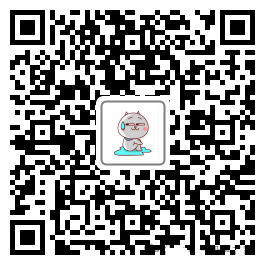
String content = "https://baike.baidu.com/item/%E5%97%B7%E5%A4%A7%E5%96%B5/19817560?fr=aladdin";

new SimpleQrcodeGenerator().setLogo("F:\\AodaCat-1.png").generate(content).toFile("F:\\AodaCat_local_logo.png");
效果如下:
案例三:在线 Logo
String content = "https://www.apple.com/cn/";

String logoUrl = "http://www.demlution.com/site_media/media/photos/2014/11/06/3JmYoueyyxS4q4FcxcavgJ.jpg";

new SimpleQrcodeGenerator().setRemoteLogo(logoUrl).generate(content).toFile("F:\\Apple_remote_logo.png");
效果如下:

案例四:自定义配置
QrcodeConfig config = new QrcodeConfig()
  .setBorderSize(2)
  .setPadding(10)
  .setMasterColor("#00BFFF")
  .setLogoBorderColor("#B0C4DE");

String content = "https://baike.baidu.com/item/%E5%97%B7%E5%A4%A7%E5%96%B5/19817560?fr=aladdin";

new SimpleQrcodeGenerator(config).setLogo("F:\\AodaCat-1.png").generate(content).toFile("F:\\AodaCat_custom.png");
效果如下:

案例五:自定义码眼样式(v1.3.0新增)
QrcodeConfig config = new QrcodeConfig()
  .setBorderSize(2)
         .setPadding(10)
  .setMasterColor("#778899")
  .setLogoBorderColor("#B0C4DE")
  .setCodeEyesPointColor("#BC8F8F")
  .setCodeEyesFormat(QreyesFormat.DR2_BORDER_C_POINT);

String content = "https://baike.baidu.com/item/%E5%97%B7%E5%A4%A7%E5%96%B5/19817560?fr=aladdin";

new SimpleQrcodeGenerator(config).setLogo("F:\\AodaCat-1.png").generate(content).toFile("F:\\AodaCat_custom.png");
效果如下:

案例六:圆形logo(v1.3.1新增)
QrcodeConfig config = new QrcodeConfig()
         .setMasterColor("#5F9EA0")
         .setLogoBorderColor("#FFA07A")
         .setLogoShape(LogoShape.CIRCLE);
String content = "abcdefghijklmnopqrstuvwxyzABCDEFGHIJKLMNOPQRSTUVWXYZ";
new SimpleQrcodeGenerator(config).setLogo("F:\\pig.png").generate(content).toFile("F:\\qrcode-circle.png");
效果如下:

版权声明:
1、本网站名称:帝企吧
2、本站永久网址:https://www.diqiba.com
3、本网站的文章部分内容可能来源于网络及作者投稿,仅供大家学习与参考,如有侵权,请联系站长进行删除处理。
4、本站一切资源不代表本站立场,并不代表本站赞同其观点和对其真实性负责。
5、本站一律禁止以任何方式发布或转载任何违法的相关信息,访客发现请向站长举报。
6、本站资源大多存储在云盘,如发现链接失效,请联系我们我们会第一时间更新。
7、本站所有资源来源于互联网,仅用于学习及参考使用,切勿用于商业用途,如产生法律纠纷本站概不负责! 8、资源除标明原创外均来自网络转载,版权归原作者所有,若侵犯到您权益请联系我们删除,我们将及时处理! 9、若您需使用非免费的软件或服务,请购买正版授权并合法使用!
1、本网站名称:帝企吧
2、本站永久网址:https://www.diqiba.com
3、本网站的文章部分内容可能来源于网络及作者投稿,仅供大家学习与参考,如有侵权,请联系站长进行删除处理。
4、本站一切资源不代表本站立场,并不代表本站赞同其观点和对其真实性负责。
5、本站一律禁止以任何方式发布或转载任何违法的相关信息,访客发现请向站长举报。
6、本站资源大多存储在云盘,如发现链接失效,请联系我们我们会第一时间更新。
7、本站所有资源来源于互联网,仅用于学习及参考使用,切勿用于商业用途,如产生法律纠纷本站概不负责! 8、资源除标明原创外均来自网络转载,版权归原作者所有,若侵犯到您权益请联系我们删除,我们将及时处理! 9、若您需使用非免费的软件或服务,请购买正版授权并合法使用!

评论(0)